File Approved: Client File Approval Software for Video Editors and Agencies
File Approved is client file approval software for video editors , motion designers, and creative agencies.
Upload any file, share a secure review link , and collect timecoded feedback and a signed approval certificate .
No client account required. No email chain needed.
Start free, no credit card required
How File Approved Works: From Upload to Signed Approval
Upload your file: Drop a video, image, PDF, audio file, Office document, or code file to your dashboard. File Approved creates a secure review link with a native viewer for that file type.Share the review link: Copy the link or send it directly. Clients open it on any device with no account, no download, and no friction. Short links via fileslink.me make sharing simple.Collect your approval: Clients leave timecoded comments, annotate frames, and click Approve or Request Revisions. You get a signed approval certificate and a full revision log.
File Approval Features for Creative Professionals
Review Tools
Timecoded video comments: Comments on video and audio attach to the exact timestamp. Clients say “at 1:24” instead of “around the two-minute mark.”Frame annotations: Clients draw directly on frozen video frames or images to mark exactly what needs changing, with no guesswork.Native file viewers: Video player, PDF viewer with page navigation, audio scrubber with timestamp comments, syntax-highlighted code viewer, zoomable image viewer, and Google Docs viewer for Office files.No client account required: Clients click the link and review instantly. No signup, no app download, no delay.
Approval Tools
One-click approval: A single button creates a timestamped approval record tied to the reviewer by name.Signed approval certificate: Every approval generates a certificate recording reviewer, approval time, file name, and version number, eliminating revision disputes.Revision request tracking: Revision requests are logged with inline comments so nothing gets lost in email threads.Version history: Upload new versions without losing prior feedback. Reviewers always see the latest file, and you keep the full audit trail.
Pro Plan Features
Unlimited review requests: No cap on active approval requests. Run as many concurrent client projects as you need.Multi-file approvals: Attach multiple files to one request. Reviewers see a gallery and can approve or request revisions on the whole set.Password-protected reviews: Add a password or require a reviewer account for confidential client projects.Client downloads: Let reviewers download files directly from the review page. ZIP downloads for multi-file requests.No branding: Remove File Approved branding from review pages for a white-label experience.
Who File Approved Is Built For
File Approved is built for video editors , motion designers , creative agencies , and freelancers who send files to clients every week. If your current process involves emailing files, waiting days for vague replies, and arguing over what was actually approved, File Approved was built for you.
Video, PDF, audio, Office documents, images, and code files all have native viewers with the right comment tools for each type.
Timecoded comments on video and audio mean clients say “1:24” instead of “around the two-minute mark.”
Every approval is timestamped and tied to the reviewer by name. Revision disputes end before they start.
Clients review on any device with no account and no download required. Fewer excuses for late feedback.
The approval certificate is a written record of client sign-off, useful when scope creep or payment disputes arise.
File Approved vs. Frame.io: A Direct Comparison
Frame.io by Adobe requires clients to create an account before reviewing anything. File Approved requires no client account at all. Frame.io starts at $15 per seat per month. File Approved has a free plan. Frame.io supports primarily video. File Approved supports video, PDF, audio, images, Office documents, and code files.
Workflow step Frame.io File Approved
Client access Client must create an Adobe account first Client clicks link, no signup required Video feedback Email thread with vague time references Timecoded comments pinned to the exact second File types Primarily video and images Video, PDF, audio, images, Office docs, code Revision tracking Reply-all email chain, easy to lose Threaded, logged revision requests per file Approval record “Sounds good” in email, not binding Signed approval certificate with date and reviewer name Monthly cost $15 per seat minimum Free to start, $25/mo for unlimited links
Simple, Honest Pricing
Free Plan, $0 per month, no credit card
1 active review link
10 GB file storage
Video, PDF, audio, image, Office, and code file viewers
Timecoded and page-specific comments
Frame annotations on video and images
One-click approve or request revisions
No login required for reviewers
Password-protected review links
Account-required reviews for confidential projects
Client file downloads
Signed approval certificate
Version history
Pro Plan, $25 per month, cancel any time
Everything in the Free plan
Unlimited active review links
5 TB file storage, expandable in 1 TB blocks at $10/mo
Multi-file approvals with gallery view
ZIP downloads of every file in a request
Custom branding on review pages
No File Approved branding on review pages
Email notifications when clients approve or request revisions
Frequently Asked Questions About File Approved
Do clients need to create an account to review my files?
No. Clients receive a link and review instantly without creating an account or downloading any app. This removes the single biggest reason clients delay feedback: the friction of signing up for a new platform. Anyone with the link can open the review page immediately. For confidential projects, every plan can add password protection or require a named reviewer to proceed.
What is File Approved and how does it work?
File Approved is client approval software for video editors, motion designers, and creative agencies. You upload a file, and the app generates a private review link. Clients open the link, leave timecoded comments or frame annotations, and click Approve or Request Revisions. Every action is logged and timestamped. Short links via fileslink.me make sharing easy.
How is File Approved different from Frame.io?
Frame.io requires clients to create an Adobe account before they can review anything. File Approved requires no client account at all. Frame.io starts at $15 per seat per month. File Approved has a free plan that includes 1 review link and 10 GB of storage. Frame.io is built primarily for video. File Approved supports video, PDF, audio, images, Office documents, and code files. It is built for freelancers and small agencies who need fast, frictionless client approvals across all file types.
Is there a free plan, and what does it include?
Yes. The Free plan includes 1 active review link, 10 GB of file storage, timecoded video and audio comments, page-specific PDF comments, frame annotations, password protection, client downloads, one-click approval, and the full approval certificate. No credit card is required. The Pro plan at $25 per month adds unlimited review links, 5 TB of storage, multi-file approvals, and custom branding with no File Approved branding on review pages.
How does the approval certificate work?
When a client clicks the Approve button on a review page, File Approved generates a timestamped approval certificate recording the reviewer name, approval time, file name, and version number. This certificate serves as a written record of sign-off and can be used to resolve payment disputes or revision scope disagreements.
What file types can I upload for client review?
File Approved supports video files (MP4, MOV, WebM), images (JPG, PNG, GIF, WebP), PDFs , audio files , Microsoft Office documents (Word, Excel, PowerPoint), and code and plain text files . Each file type gets a native viewer: video gets a timecoded player, PDFs get a page navigator, audio gets a scrubber with timestamp comments, Office files open in Google Docs viewer, and code files get syntax highlighting.
Can I use File Approved for multiple client projects at the same time?
Yes. Each approval request is a separate review link with its own comment thread, approval status, and version history. The Free plan supports 1 active link at once. The Pro plan removes that limit entirely, so agencies managing many concurrent projects can create as many links as needed. Pro also supports multi-file requests, so one link can hold an entire deliverable set.
Create your free File Approved account ·
Help Center ·
Changelog ·
Terms & Privacy
Help Center
Sending one proof to several people
You often need the same proof seen by more than one person. Add them all when you create the request and each one gets their own link, so you can tell who did what.
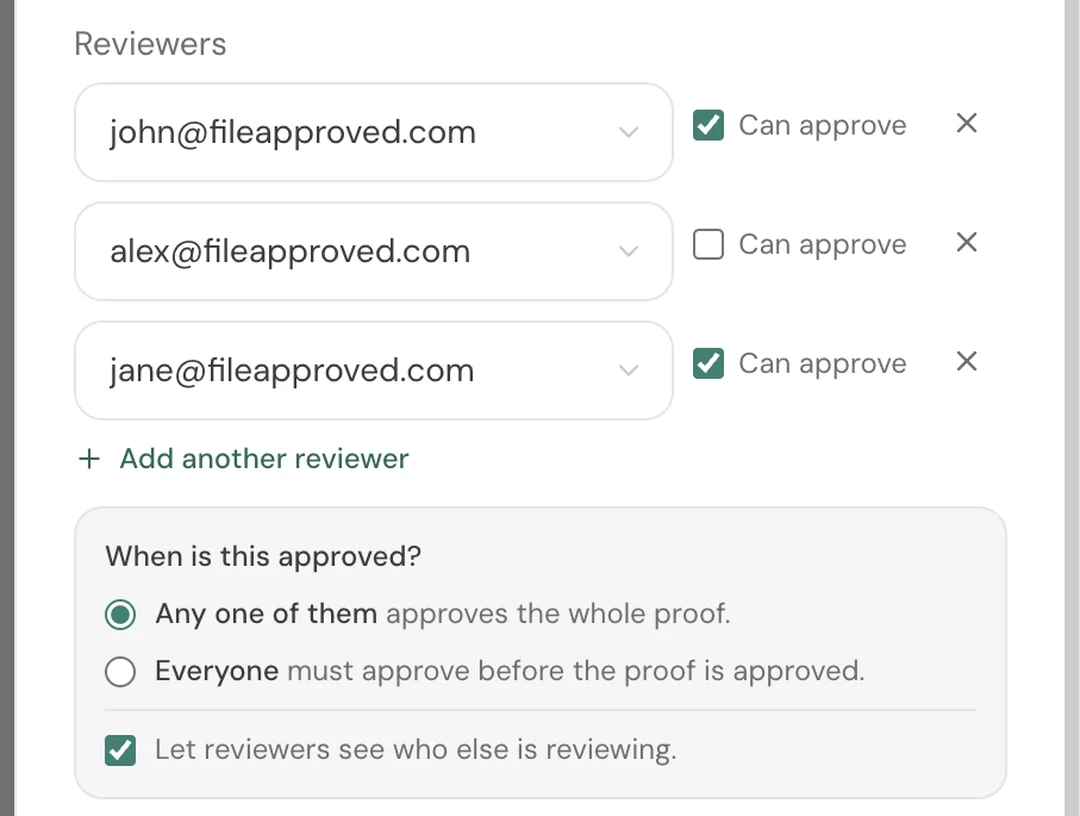
When you create a request, choose Send by Email, then add an address for each reviewer. Everyone you add can comment and request revisions. The Can approve checkbox controls who is allowed to close the proof, so you can send it to a wider group while keeping sign-off with one or two people.
You then choose when the proof counts as approved. Any one of them means the first person with approval rights closes it. Everyone means it stays open until every approver has approved, which suits sign-off that genuinely needs several people.
Anyone can request revisions at any point, including people who cannot approve. A revision request reopens the proof straight away and clears any approvals already given, so nothing is ever marked approved while someone on the list has objected. The next person to open the link sees the revision request and can add to it.
Uploading a new version starts everyone fresh. Approvals never carry across a file change.
On the request page you get a line for each reviewer showing whether they have opened it, viewed it, approved it or asked for revisions, with the time. You can add someone later, resend an invite to anyone who has not acted, or remove a reviewer, which switches off their link immediately. Removing somebody never changes a decision that has already been made: if the proof is approved, it stays approved and the certificate is unchanged.
By default reviewers cannot see each other. Turn on Let reviewers see who else is reviewing if you want them to, which is useful for a team reviewing together and worth leaving off when two clients do not know they are both on the list. With it on, each invite email lists the other reviewers by name and email address under "Also sent to", so everyone can see who has the proof. Each person still gets their own email with their own link, because that link is how File Approved knows who opened, commented and approved. If you add someone later, emails that already went out won't name them, so use Resend if you want everyone to have the updated list.
Each personal link identifies whoever opens it, so treat it like any emailed link: if a reviewer forwards theirs, the person who receives it reviews under their name. Add a password or require an account when that matters.
Sending to more than one reviewer is a Pro feature. On the free plan you can send each proof to one reviewer.